Sounding Out Syllables
Learn the little sound-chunks that all English words are built from, then play a listening game to see how quickly you can spot them.
Who is this for?
This tool is for anyone who can read some English but still freezes when a long word turns up.
Long words aren't really long — they're just short chunks stuck together, like cup-cake or sun-flow-er. Once you know the chunks, big words stop being scary and start being easy.
What will you learn?
Sounding Out Syllables teaches you the most common chunks first, so you learn the ones you'll meet most often. Here's what you get to do:
- Learn six syllables at a time and hear exactly how each one sounds.
- Record yourself saying them and play your own voice back.
- Play a listening game where you hear a sound and pick the chunk that matches.
You can repeat a lesson as many times as you like. The app quietly times you, so you can watch yourself getting quicker without anyone else seeing.
How to use it — step by step
Step 1 — Find Learning Activities
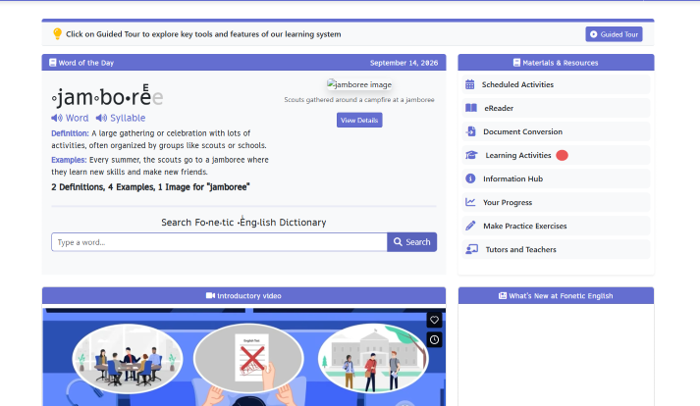
When you open the app, look at the list on the right called Materials & Resources. Every line is something you can do. Click Learning Activities to open the full list.
Step 2 — Click “Sounding out syllables”
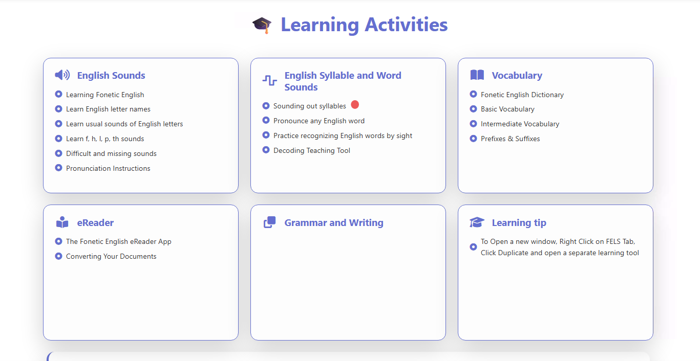
A page of cards appears. Find the card called English Syllable and Word Sounds and click Sounding out syllables at the top of it. That opens your first lesson straight away.
Step 3 — Meet your first lesson
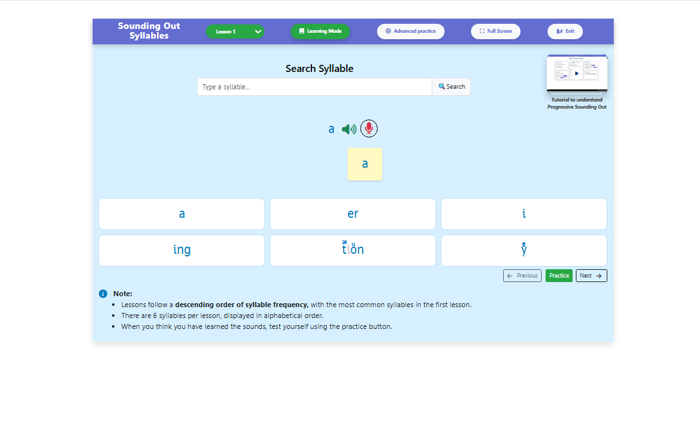
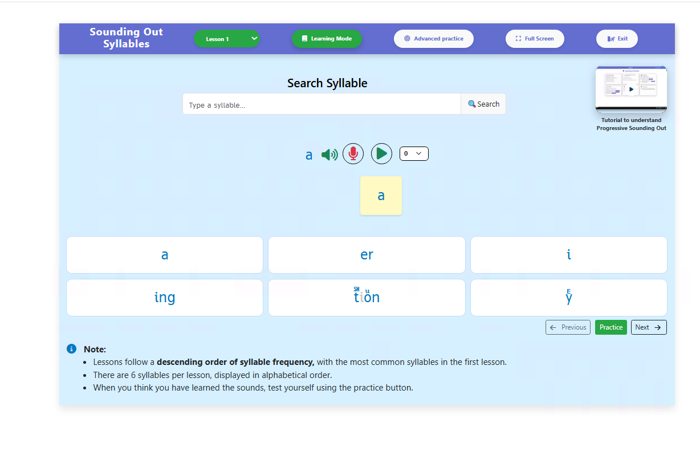
You'll see six syllable cards, which is one lesson's worth. The note at the bottom explains that the most common chunks come first, so Lesson 1 is full of the ones you'll bump into everywhere. Above the cards is a syllable with a blue speaker and a red microphone next to it.
Step 4 — Press the red microphone and say the syllable
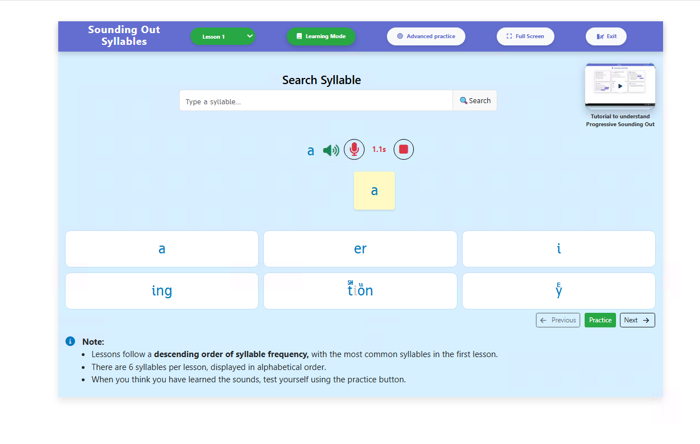
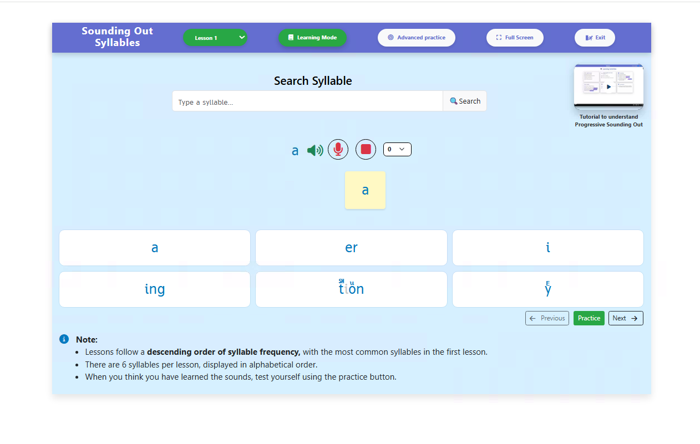
Click the blue speaker first to hear how the chunk should sound. Then click the red microphone — that's Record — and a timer starts counting, so you know the app is listening. Say the chunk out loud, then click the red square to stop.
Step 5 — Press the green play arrow
Once you've stopped recording, a green arrow appears next to the microphone. Click it to hear the recording you just made. It's a bit like a selfie, but with sound instead of a photo.
Step 6 — Listen carefully and compare
While your voice plays, the green arrow turns into a red square. Listen closely, then click the blue speaker again and see how close you got. If it sounded different, record again — that's exactly what practice is.
Step 7 — Click Practice
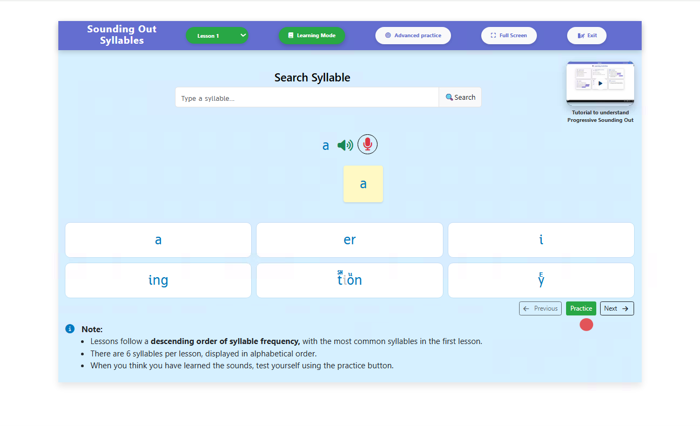
When you feel happy with the six chunks, look for the green Practice button under the cards. Click it to swap from learning to a listening game. This is where you find out which ones really stuck.
Step 8 — Click Get Started
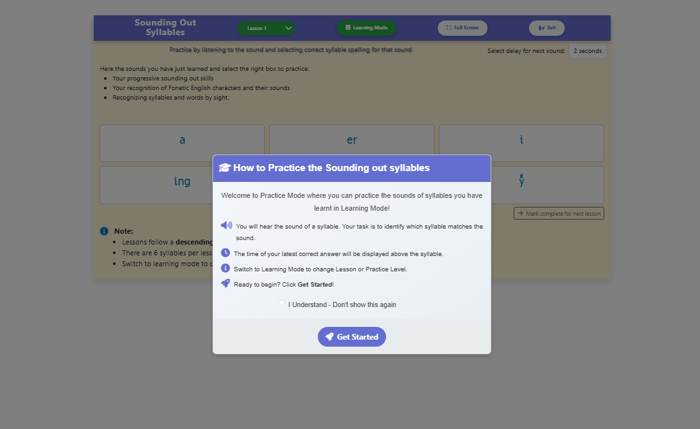
A box pops up explaining how the game works: you'll hear a syllable, and your job is to click the card that matches the sound. Give it a quick read so you know what's coming. When you're ready, click the blue Get Started button.
Step 9 — Listen, then click the matching card
The six cards are still there, but now the app plays a sound and waits for you to choose. There's also a delay setting at the top, which decides how long the app waits before playing the next sound. Take your time — speed comes later.
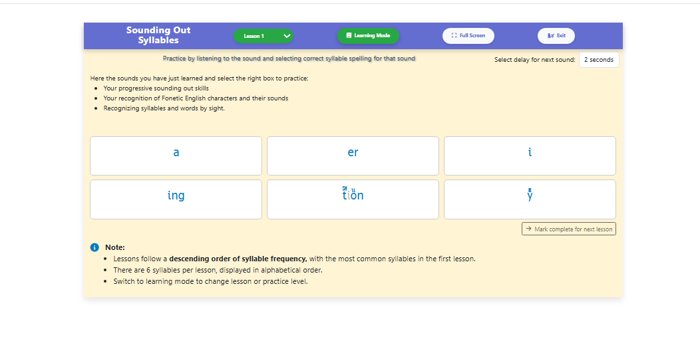
Step 10 — Yay, you got it right!
A correct card turns green and shows how many seconds you took. The app also tells you your best time so far for any syllable. There's no prize for rushing, but it's fun to watch that number come down.
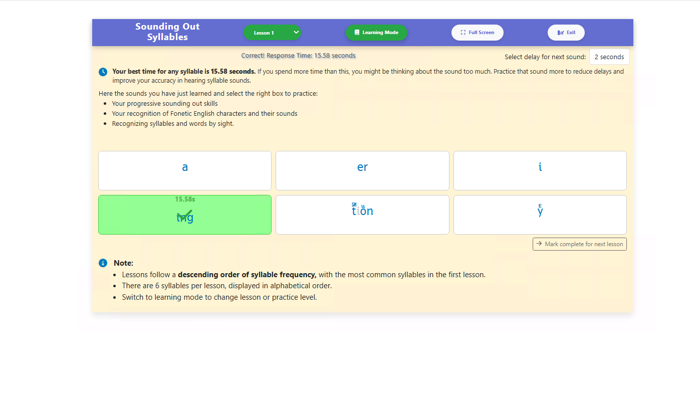
Step 11 — Picked the wrong one? No problem
If you choose the wrong card, yours gets a red cross and the correct one turns green, with a line at the top naming it. So you always find out the right answer straight away. Mixing up two similar chunks is completely normal — that's exactly what this game is for.
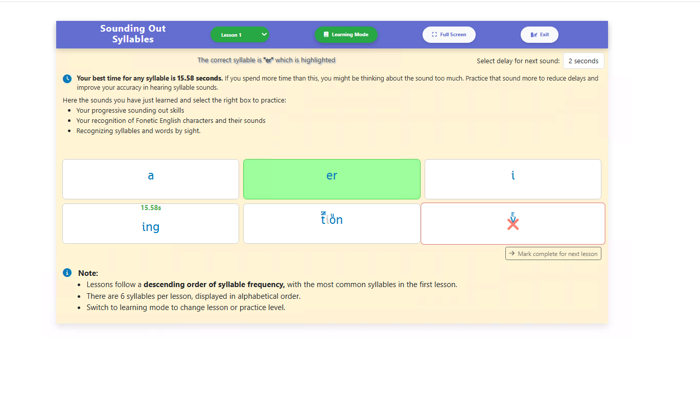
Step 12 — Try Advanced practice
When the six chunks feel easy, click the Advanced practice button at the top. A box pops up explaining this harder version, where the chunks aren't always the ones you've just practised. Click Get Started when you're ready for the challenge.
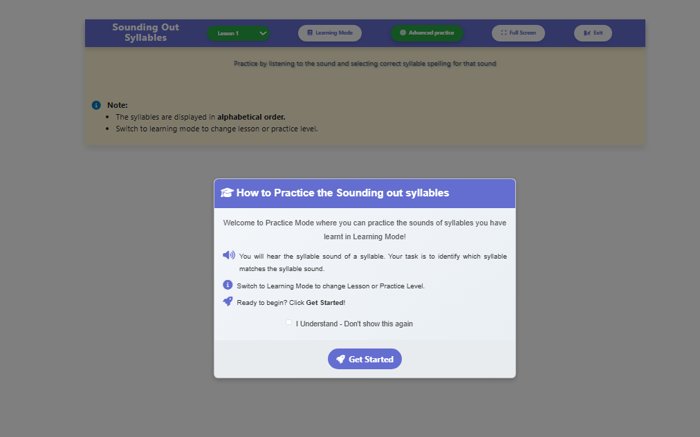
Step 13 — Mixed-up syllables appear
In advanced practice the app picks syllables from a wider set, so you can't guess from memory alone. You have to actually listen. This is the bit that turns knowing the chunks into recognising them instantly.
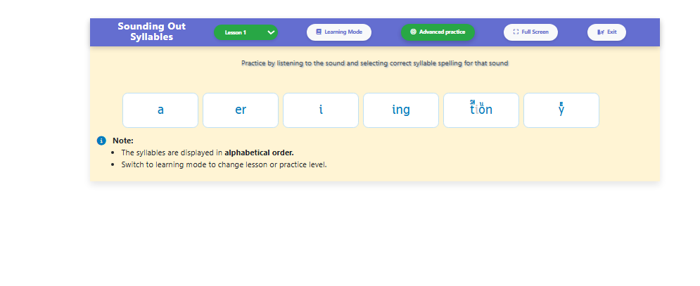
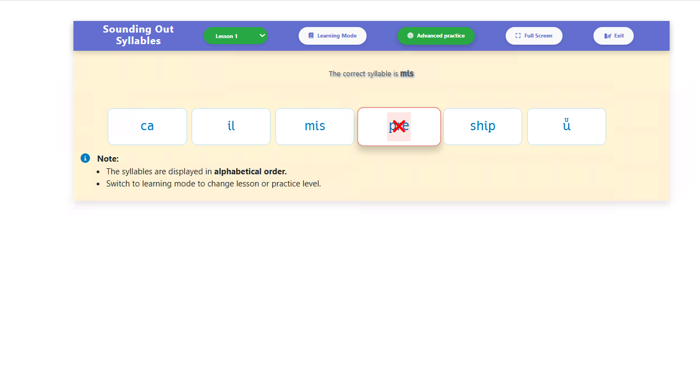
Step 14 — Picked the wrong one? No problem
Just like before, a wrong card gets a red cross and the app tells you at the top which syllable was correct. Look at the two of them side by side for a second before you carry on. Noticing why you mixed them up is the useful part.
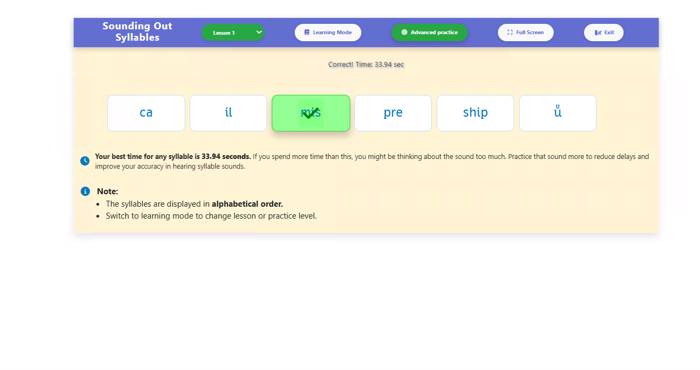
Step 15 — Yay, you got it right!
A correct card turns green and the app says “Correct!” along with your time. Advanced times are usually slower than learning-mode times, and that's completely expected. Keep going — it speeds up quickly.
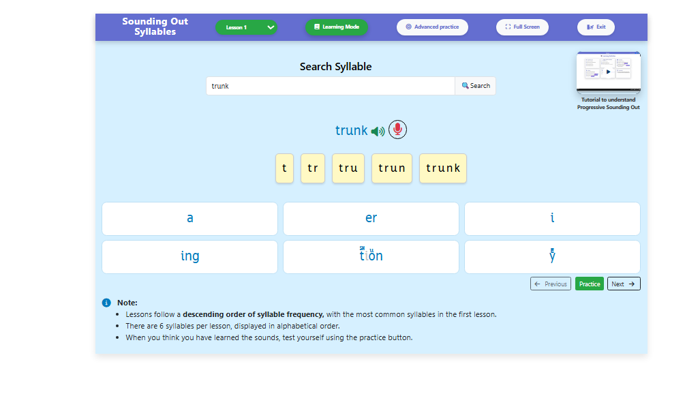
Step 16 — Search any word you're curious about
Back in learning mode there's a Search Syllable box at the top. Type in any word and the app builds it up one chunk at a time, so “trunk” becomes t, tr, tru, trun, trunk. It's a brilliant trick for a word that's been bothering you.
Step 17 — Click Exit to see your report
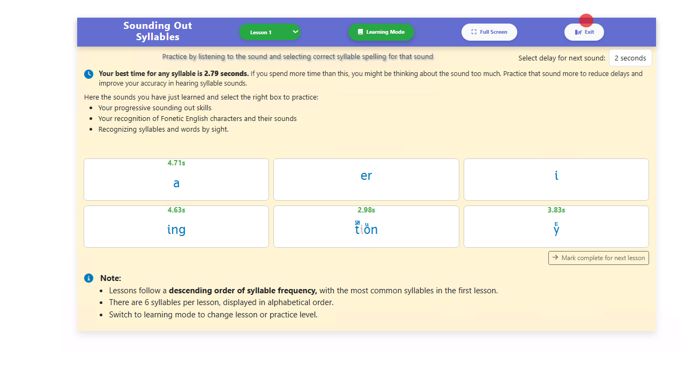
When you've had enough for today, click the Exit button in the top right corner. Don't worry — this doesn't throw away your work. It opens a little report of how you did.
Step 18 — Look at your Practice Report
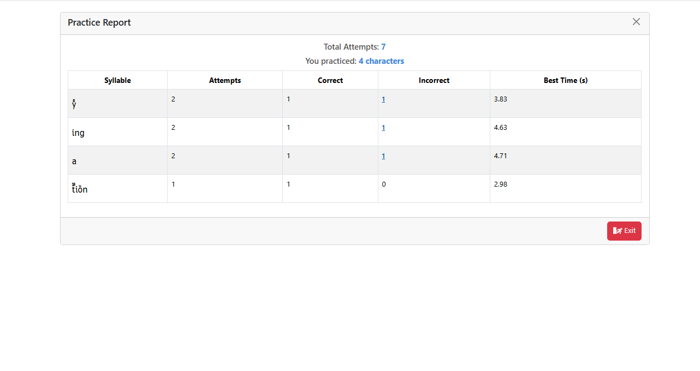
The report shows every syllable you tried, how many goes you had, how many you got right, and your best time. It's a quick picture of what's already easy and what still needs a bit of love. Nobody sees this but you.
Step 19 — Click a red number to see more
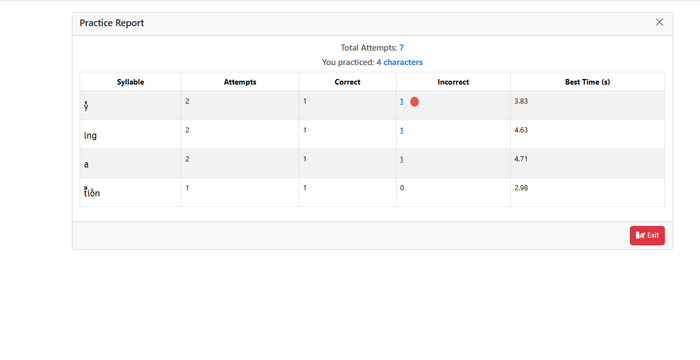
In the Incorrect column, any red number can be clicked. Click one for a syllable you kept getting wrong. The app will show you exactly what happened.
Step 20 — See which chunks you mixed up
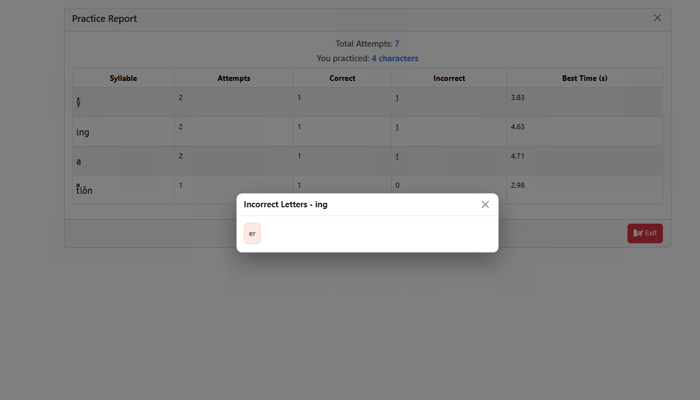
A little box opens showing the syllables you picked by mistake. Those pairs are your homework — they're the ones that sound alike to your ears right now. Close the box and you're done.
Handy tip
When a long word blocks you, cover it with your finger. Slide your finger along and reveal one chunk at a time, saying each one as it appears, then run them together. Almost every “impossible” word turns out to be three easy ones standing next to each other.