Teaching tools for native English speakers
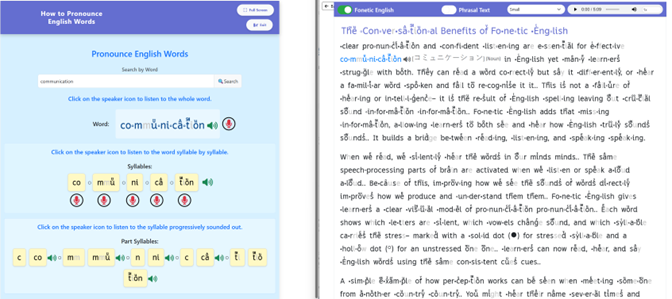
Note: you can open two tool windows at the same time. This is useful when, for example, a student is reading and wants to hear how a word sounds — you can have the Pronounce Any Word tool open alongside the eReader.
In the image below, the student has clicked on the word “communication” in the eReader and types in “communication” into the tool “How to pronounce any word” to better understand how to pronounce it
Stage 1 — Learning English Sounds
This is where every student starts. It covers the 42 sounds of English and their Fo√ne…tic √Ēng…lish representations
- What it teaches
- English has 42 sounds (phonemes) but only 26 letters. This means letters must make more than one sound, and Fo√ne…tic √Ēng…lish needs a unique character for each sound. The English Sounds tool teaches students all 42 sounds and the Fo√ne…tic √Ēng…lish character that represents each one.
- Why this matters
- Most native English speakers can produce all 42 sounds — they use them every day when speaking. What they often do not know is the sound of each letter in isolation. They can recite the alphabet by letter name (A, B, C...) but the letter name is not the same as the letter's usual sound. The usual sound of 'c' is the sound it makes at the start of 'cat', not the name 'see'. Many students — including older teenagers — do not know this distinction.
- Learning to associate each Fo√ne…tic √Ēng…lish character with its sound is the foundation of everything else. Without this, a student cannot use the Fo√ne…tic √Ēng…lish cues in text.
- Learning Mode
- The tutor and the student can scroll through 14 pages, each showing 3 sounds. The tutor should ask the student what sound the Fo√ne…tic √Ēng…lish character makes to find those characters and sounds that the student does not know. The tutor can show the student that the sound of the character is played when you click on a speaker icon. This is how students can learn the sounds of the Fo√ne…tic √Ēng…lish characters.
- Practice Mode — Basic
- The student hears a sound and selects the correct box from 3 displayed options. This is well suited to younger children who are learning the Fo√ne…tic √Ēng…lish alphabet for the first time.
- Practice Mode — Advanced
- The student hears a sound and selects the correct box from 6 options showing only the Fo√ne…tic √Ēng…lish characters. Response time is recorded. This is the target mode: the student should eventually be able to do this quickly, without any conscious effort.
- For students from other language backgrounds
- Fo√ne…tic √Ēng…lish has analysed a large number of languages to identify which English sounds match sounds in the student's native language, which are close, and which are missing entirely. When you select the student's language from the dropdown menu, the tool reorganises the content to focus on what the student actually needs to learn.
- Same sounds: the student already knows these. They just need to learn the Fo√ne…tic √Ēng…lish character for them. This is fast.
- Close sounds: similar to the native language equivalent. These can usually be learned quickly with a little attention.
- Missing sounds: the student has never produced these in their native language. These need more time and practice.
- For native English speakers, this distinction is less relevant since they can already produce all 42 sounds. The focus is on learning the Fo√ne…tic √Ēng…lish characters for each sound.
Tutor tip — what to watch for in the first session
Ask the student to say each sound as they click through the Learning Mode.
Common gaps for native English speakers:
• The short 'u' sound as in 'put' (different from 'but') — many students do not distinguish these
• The difference between voiced and unvoiced 'th' (as in 'that' vs 'think')
• The 'ng' sound at the end of 'sing'
When you find a gap, note it and give it extra attention in practice. But do not let this slow down the overall progress — move through the tool and come back to problem sounds.
Stage 2 — Learning Syllable Sounds
Once a student knows the Fo√ne…tic √Ēng…lish characters, this tool will quickly help a student to quickly and reliably decode syllables and single syllable words. A second tool, similar to the first tool, teaches students to recognize the sound of multisyllable words.
- Why syllables?
- A syllable is short. Because it is short, it puts very little load on working memory — the part of the brain that holds information while you are thinking. This matters because working memory can only hold about 2 to 4 new pieces of information at a time, and for as little as 20 seconds.
- When a student learns the sound of a syllable – the student sees a syllable and instantly knows its sound – the syllable moves into long-term memory. From that point on, the syllable no longer takes up working memory space. Learning just 200 of the most common syllables is enough to decode thousands of English words.
- Progressive Sounding Out
- The key technique is progressive sounding out. Rather than saying each sound separately and then trying to blend them (/c/ ... /a/ ... /t/ ... cat), the student builds the syllable step by step, adding one sound at a time:
- /m/ → /me/ → /men/ → /ment/
- At each step, the student holds only two things in working memory: the sound they have built so far, and the next sound to add. This keeps the cognitive load small and makes accurate blending much easier. A student can see and hear the progressive sounding out of any English syllable by using the Sounding out Syllables tool and can practice their own pronunciation right inside the tool.

- Learning Mode
- The student sees a grid of syllable boxes. Clicking a box plays the full syllable. Clicking the speaker icon plays the syllable progressively sounded out — step by step, as described above. The student clicks through the syllables at their own pace, hearing and repeating each one.
- Practice Mode — Basic
- The student has the same 6 boxes as in the learning Mode. The student hears a sound and clicks the correct syllable. Response time is recorded and displayed. The aim is to drive response times down until the student can identify the syllable without any conscious effort.
- Practice Mode — Advanced
- Advanced mode has 6 boxes in a line and displays syllables the student may not have seen. A sound is played and the student must click on the box or boxes that have characters representing the sound. This may require the student to decode the syllable sound on the fly, which integrates progressive sounding out, reinforces the sound that Fo√ne…tic √Ēng…lish characters make and helps students to sound out words syllable by syllable.
- Pronounce Any English Word
- This tool lets the student type in any word and hear it pronounced, both as a whole word and syllable by syllable, with each syllable progressively sounded out. It is a useful reference tool during reading — if a student encounters a word they cannot decode, they can look it up here. The Pronounce Any English Word can be opened next to the eReader.
Stage 3 — Practice Recognizing Words by Sight
- Practice Recognising Words by Sight
This is a separate tool from the Syllable tool. It works the same way — hear a sound, click the correct representation — but the student is now working with whole words rather than syllables.
Words are grouped by number of syllables. The student practises the same way as with syllables: hear a word, click the correct representation. This is the bridge between syllable recognition and full word sight recognition. Practicing recognizing words by sight will mean that the student will need to decode on the fly the syllables they do not already know. If students have learned some prefixes and suffixes, they will be able to recognize them and infer the meaning of the word if they know the root word.
How much time to spend on syllables before starting to read?
This is a judgement call. Some students enjoy the syllable practice and find it satisfying — the immediate feedback and improving response times give a clear sense of progress. Others get bored and want to read.
A good rule of thumb: once a student can comfortably identify the most common syllables in Practice Mode without much hesitation, start reading. You do not need to complete all 200 syllables first. Students can continue syllable practice as homework while they begin reading in sessions.
The syllable tool is well suited to homework because it is self-contained, self-correcting, and quick to do. Assign specific groups of syllables and check the response time data in the next session.
Who Is Fo√ne…tic √Ēng…lish For?
🌍
Educators
📖
Foundation Partners
👩🏫
Commercial Partners
👨👩👧
Parents
👩🏫