Tutor Guide: Teaching Native English Speakers
How to use the Fo√ne…tic √Ēng…lish tools to take students from slow decoding to fluent reading
Why English is hard to read — and what Fo√ne…tic √Ēng…lish does about it
Most native English speakers can speak fluently before they start school. They know thousands of words. They understand grammar. But reading is different — and for many students, it stays hard for years.
The reason is simple: English spelling is erratic. The same letters make different sounds in different words, and there is no reliable rule to tell a reader which sound to use. A student looking at the word 'signed' has no way of knowing which of the 76,800 possible sounds is the correct sound. The spelling does not contain enough information for the sound to be decoded. This is not the student's fault. It is a lack of information in English spelling.
Humans remember things that make sense. So if the sound and spelling of a word make sense, students can remember the sound of the word by sounding it out a few times. The student will be able to look at the word and instantly know its sound. This is called a sightword.
Humans have evolved a filter to stop us remembering random information so our minds are not clogged with low value information. Our minds see erratically spelled words as random information, and students need to overcome the memory filter if they are to remember it. This means students must remember the sound of an erratically spelled word by rote, which means hearing the word and seeing its shape, and repeating until it sticks — which can take 20 to 50 repetitions per word. That is slow, and it is boring.
So students learn sightwords using
Research supports this. In countries with phonetic languages — where words can be sounded out reliably — literacy rates are significantly higher than in English-speaking countries, and dyslexia is diagnosed far less often. Fo√ne…tic √Ēng…lish applies the same principle: make English decodable, and students learn to read faster, with less struggle and more confidence.
The goal of reading is fluency. Reading involves running your eyes over a line of written words and “hearing” the “silent word sounds” in your head. Reading repurposes the speech part of the brain to “hear” the “silent sounds”. Because the speech part of the brain is repurposed, humans understand best when reading is at the speed of speech, about 100 words per minute, which is called fluent reading. Fluency comes from sight-word recognition: seeing a word and instantly knowing its sound, without having to think about it. When reading becomes automatic, the brain can focus entirely on meaning rather than on working out the sounds of words. Fo√ne…tic √Ēng…lish is the fastest route to building that recognition.
What the student sees in Fo√ne…tic √Ēng…lish text
It is worth being clear about this, because it surprises many people the first time they see it.
Fo√ne…tic √Ēng…lish em√beds āll tңê in…for√mâ…ťiòn yoů nêed tȷ √qüick…lý, in√tů…it…ive…lý and √acc…ů…rate…lý sijund ijut √än…ý √Ēng…lish wòrd, which is tңè √rê…ál ob√jec…tive of √Рho…nics 1.0. With Fo√ne…tic √Ēng…lish, thẂre iş next tȷ √nò…thing tȷ learn! √Män…ý √pêo…ဇle can √fig…ure ijut Fo√ne…tic √Ēng…lish just bΥ √sêe…ing text in Fo√ne…tic √Ēng…lish..
A student reading Fo√ne…tic √Ēng…lish text sees the word exactly as it appears in any English book or website. The spelling does not change, so students can learn to decode a word sound using Fo√ne…tic √Ēng…lish and can quickly remember the shape of the word and the sound.
Humans evolved to be able to recognize the shape of camouflage predators. Humans can read using multiple fonts. Programs like CAPTCHA use this skill to disguise words so that humans can show they are real humans. Because Fo√ne…tic √Ēng…lish preserves the shape of the word, students can read that word in standard English as well as Fo√ne…tic √Ēng…lish.
What Fo√ne…tic √Ēng…lish adds all the information needed to sound out any English word:
- Sound characters appear as small superscript letters above a spelling character when that character does not make its usual sound. The student learns these characters as part of learning Fo√ne…tic √Ēng…lish. Once learned, they remove all ambiguity about which sound to make.
- Silent letters are greyed out. The student can see them — which matters for spelling — but knows not to say them.
- Syllable breaks are marked with a solid dot for a stressed syllable and a hollow dot for an unstressed syllable. This guides the student to the correct rhythm and stress of the word.
A person who can already read English can pick up Fo√ne…tic √Ēng…lish text and read it immediately. The Fo√ne…tic √Ēng…lish cues are intuitive and do not get in the way. For a student who is still learning, those same cues remove every source of ambiguity.
The core principle: you are building automaticity, not explaining rules
This is the most important thing to understand before you start teaching with Fo√ne…tic √Ēng…lish.
The goal is not for a student to consciously apply rules. The goal is for recognition to become so fast and effortless that the student does not have to think at all. This is called automaticity, and it is what separates a fluent reader from a struggling one. Fluent readers can devote all their focus on understanding what they read, so comprehension and learning outcomes can markedly improve.
The Fo√ne…tic √Ēng…lish tools measure automaticity directly through response time. When a student responds quickly and correctly, their brain is recognising — not calculating. When they are slow, they are still thinking it through. Your job is to help them get from thinking to recognising.
Teaching tools for native English speakers
Fo√ne…tic √Ēng…lish has five main tools that are used for native English speakers. Each one targets a specific skill. You will use them in roughly the order they appear here, but you will also run them in parallel once a student has the basics. Stage 1 (sounds) should be introduced before Stage 2 (syllables), but from Stage 2 onwards you will often be working on two or three stages in the same session.
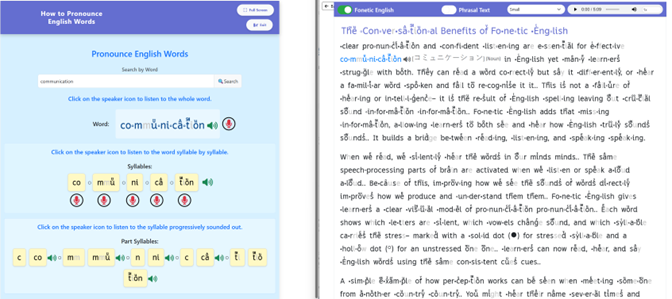
Note: you can open two tool windows at the same time. This is useful when, for example, a student is reading and wants to hear how a word sounds — you can have the Pronounce Any Word tool open alongside the eReader.
In the image below, the student has clicked on the word “communication” in the eReader and types in “communication” into the tool “How to pronounce any word” to better understand how to pronounce it
- Stage 1 — Learning English Sounds
This is where every student starts. It covers the 42 sounds of English and their Fo√ne…tic √Ēng…lish representations
- What it teaches
English has 42 sounds (phonemes) but only 26 letters. This means letters must make more than one sound, and Fo√ne…tic √Ēng…lish needs a unique character for each sound. The English Sounds tool teaches students all 42 sounds and the Fo√ne…tic √Ēng…lish character that represents each one.
- Why this matters
Most native English speakers can produce all 42 sounds — they use them every day when speaking. What they often do not know is the sound of each letter in isolation. They can recite the alphabet by letter name (A, B, C...) but the letter name is not the same as the letter's usual sound. The usual sound of 'c' is the sound it makes at the start of 'cat', not the name 'see'. Many students — including older teenagers — do not know this distinction.
Learning to associate each Fo√ne…tic √Ēng…lish character with its sound is the foundation of everything else. Without this, a student cannot use the Fo√ne…tic √Ēng…lish cues in text.
- Learning Mode
The tutor and the student can scroll through 14 pages, each showing 3 sounds. The tutor should ask the student what sound the Fo√ne…tic √Ēng…lish character makes to find those characters and sounds that the student does not know. The tutor can show the student that the sound of the character is played when you click on a speaker icon. This is how students can learn the sounds of the Fo√ne…tic √Ēng…lish characters.
- Practice Mode — Basic
The student hears a sound and selects the correct box from 3 displayed options. This is well suited to younger children who are learning the Fo√ne…tic √Ēng…lish alphabet for the first time.
- Practice Mode — Advanced
The student hears a sound and selects the correct box from 6 options showing only the Fo√ne…tic √Ēng…lish characters. Response time is recorded. This is the target mode: the student should eventually be able to do this quickly, without any conscious effort.
- For students from other language backgrounds
Fo√ne…tic √Ēng…lish has analysed a large number of languages to identify which English sounds match sounds in the student's native language, which are close, and which are missing entirely. When you select the student's language from the dropdown menu, the tool reorganises the content to focus on what the student actually needs to learn.
- Same sounds: the student already knows these. They just need to learn the Fo√ne…tic √Ēng…lish character for them. This is fast.
- Close sounds: similar to the native language equivalent. These can usually be learned quickly with a little attention.
- Missing sounds: the student has never produced these in their native language. These need more time and practice.
For native English speakers, this distinction is less relevant since they can already produce all 42 sounds. The focus is on learning the Fo√ne…tic √Ēng…lish characters for each sound.
- Stage 2 — Learning Syllable Sounds
Once a student knows the Fo√ne…tic √Ēng…lish characters, this tool will quickly help a student to quickly and reliably decode syllables and single syllable words. A second tool, similar to the first tool, teaches students to recognize the sound of multisyllable words.
- Why syllables?
A syllable is short. Because it is short, it puts very little load on working memory — the part of the brain that holds information while you are thinking. This matters because working memory can only hold about 2 to 4 new pieces of information at a time, and for as little as 20 seconds.
When a student learns the sound of a syllable – the student sees a syllable and instantly knows its sound – the syllable moves into long-term memory. From that point on, the syllable no longer takes up working memory space. Learning just 200 of the most common syllables is enough to decode thousands of English words.
- Progressive Sounding Out
The key technique is progressive sounding out. Rather than saying each sound separately and then trying to blend them (/c/ ... /a/ ... /t/ ... cat), the student builds the syllable step by step, adding one sound at a time:
- /m/ → /me/ → /men/ → /ment/
At each step, the student holds only two things in working memory: the sound they have built so far, and the next sound to add. This keeps the cognitive load small and makes accurate blending much easier. A student can see and hear the progressive sounding out of any English syllable by using the Sounding out Syllables tool and can practice their own pronunciation right inside the tool.

- Learning Mode
The student sees a grid of syllable boxes. Clicking a box plays the full syllable. Clicking the speaker icon plays the syllable progressively sounded out — step by step, as described above. The student clicks through the syllables at their own pace, hearing and repeating each one.
- Practice Mode — Basic
The student has the same 6 boxes as in the learning Mode. The student hears a sound and clicks the correct syllable. Response time is recorded and displayed. The aim is to drive response times down until the student can identify the syllable without any conscious effort.
- Practice Mode — Advanced
Advanced mode has 6 boxes in a line and displays syllables the student may not have seen. A sound is played and the student must click on the box or boxes that have characters representing the sound. This may require the student to decode the syllable sound on the fly, which integrates progressive sounding out, reinforces the sound that Fo√ne…tic √Ēng…lish characters make and helps students to sound out words syllable by syllable.
- Pronounce Any English Word
This tool lets the student type in any word and hear it pronounced, both as a whole word and syllable by syllable, with each syllable progressively sounded out. It is a useful reference tool during reading — if a student encounters a word they cannot decode, they can look it up here. The Pronounce Any English Word can be opened next to the eReader.
- Stage 3 — Practice Recognizing Words by Sight
- Practice Recognising Words by Sight
This is a separate tool from the Syllable tool. It works the same way — hear a sound, click the correct representation — but the student is now working with whole words rather than syllables.
Words are grouped by number of syllables. The student practises the same way as with syllables: hear a word, click the correct representation. This is the bridge between syllable recognition and full word sight recognition. Practicing recognizing words by sight will mean that the student will need to decode on the fly the syllables they do not already know. If students have learned some prefixes and suffixes, they will be able to recognize them and infer the meaning of the word if they know the root word.
- Stage 4 — Vocabulary
This tool teaches word meanings. It is used alongside the other tools, not after them. Vocabulary work keeps sessions engaging and gives you a second way to assess where a student is.
- How vocabulary is taught
Words are taught in short sentences. The student reads the sentence in Fo√ne…tic √Ēng…lish and can click on any word to see its meaning either in only simple, familiar English words — never using harder words to explain an easier word, or by having a precise translation of the word into a student’s native language.
The student can also click on the whole sentence to see a translation of the full sentence. This is more useful than word-by-word translation because many words change meaning depending on context. The full sentence translation gives the correct meaning for that specific use.
- Two vocabulary systems
- The vocabulary tool has two parts that students move through in sequence.
- Basic Vocabulary covers A0 and A1 — the simplest everyday English. Native English speakers already know the meaning of these words from speech, so for confident readers Basic Vocabulary is normally skipped. For struggling readers it has a different and important purpose, described below.
Intermediate Vocabulary covers A2, B1 and B2 and is where most native speakers begin. The student is presented with two sentences each containing a blank, and chooses from a small set of options the one word that fits both sentences naturally. The student must work out the meaning from English context — there is no translation crutch — which is exactly the skill they will use whenever they meet an unfamiliar word in real reading..
The Intermediate sentences are deliberately built almost entirely from A0 and A1 words the student already knows. So as the student learns each new A2, B1 or B2 word, the surrounding words are reinforcing earlier vocabulary at the same time. Forward progress and consolidation happen together.
- Who Basic Vocabulary is for
For most native English speakers — confident readers of any age who already know A0 and A1 words from speech — Basic Vocabulary is too easy and the student should start at Intermediate Vocabulary at the level appropriate to their age and reading ability.
- Basic Vocabulary is genuinely useful, however, for two specific groups:
- Students who find standard English spelling hard to decode. Many of these students are diagnosed with dyslexia or labelled as struggling readers. They already know the meaning of the words, which is actually an advantage — it lets them put their full attention on decoding the FE markup without having to also work out what the word means.
- Students learning to read for the first time, including young children. Same logic: they already know the words from speech, so their full attention can go on the decoding skill being built.
For both groups, the value of Basic Vocabulary is not vocabulary acquisition (they already have those words) — it is decoding practice on words whose meanings they already know. This is the most efficient way to build the link between spelling and sound, because nothing else is competing for attention. Once that link is firm, decoding becomes automatic, words become sight words, and reading speeds up to the point where comprehension flows naturally.
- Why this method works
- The student is inferring meaning from context, which is what makes words stick.
- The student is confirming those inferences in their own language, so they know the correct meaning even if the inference was not right.
- The student is seeing Fo√ne…tic √Ēng…lish markup, so correct pronunciation is built in from the very first encounter with a word.
- The student is hearing the sentence pronounced, so they can check their decoding of the Fo√ne…tic √Ēng…lish markup against the real sound.
- The student is meeting words inside the kind of sentences they will actually use, not in isolation.
- The student is absorbing basic grammar — word order, the difference between a statement and a question, simple verb forms, common prepositions — without having to study it directly. ESL students often arrive convinced they need separate grammar study; reassure them that the sentences are doing this work quietly.
- The student is recording their own voice, which trains not only the sounds but the rhythm and intonation of English.
- And because the student is reading throughout, their reading improves alongside their vocabulary.
A student who rushes through sentences without recording, clicks immediately without trying to infer, or skips the quizzes is losing several of these benefits at once. Use the dashboard to spot these patterns and intervene early.
- Word lists by level
Vocabulary is organised into CEFR levels: A0, A1, A2, B1 and B2. For native English speakers, A0 and A1 words are typically already known. The student's starting point for new vocabulary is usually A2, though this varies by age and background.
| Approximate age | Starting vocabulary level |
|---|---|
| 4-5 | A0–A1 (learning the words they already say) |
| 6–7 | A1–A2 |
| 8–9 | A2–B1 |
| 10-11 | B1 |
| 12-13 | B1–B2 |
| 14-16 | B2 |
| 17+ | B2–C1 depending on the student |
| Struggling adult | Start at A2 regardless of age, adjust quickly based on performance |
These are starting points only. Adjust immediately based on what you see in the first session.
- Prefixes and suffixes
Fo√ne…tic √Ēng…lish marks syllable boundaries in words, which makes prefixes and suffixes easy to spot visually. The vocabulary tool includes courses that teach the meaning of common prefixes and suffixes. This is important because a student who knows a root word and understands common prefixes and suffixes can infer the meaning of many words they have never seen before. This reduces the total number of words that need to be learned by around 30%.
- The Fo√ne…tic √Ēng…lish Dictionary
The dictionary gives the full pronunciation of any word — as a whole, syllable by syllable, and each syllable progressively sounded out. It also contains definitions, related words, phrasal verbs and idioms. Students can use this during reading sessions when they want to explore a word further. It is suggested that tutors keep it separate from the vocabulary teaching flow — use it as a reference, not as the main teaching method.
- Stage 5 — The eReader
The eReader is where reading practice happens. It is the most important tool for building fluency, and you should get students into it as soon as they have enough foundation to make reading productive.
- Why reading matters so much
Fluent reading is the goal. It means reading at roughly the speed of speech — fast enough that the brain can focus on meaning rather than on decoding. This level of fluency requires two things: a large bank of sight words, and myelinated neural pathways (meaning the brain's reading circuits have been strengthened through practice until they work very fast and reliably).
The only way to build both is through a lot of reading. Every time a student reads a word, that word's neural pathway is reinforced. The more they read, the faster their pathways become. The faster the pathways, the more they can read in a session. Reading is a compounding skill — it builds on itself.
- What the eReader provides
The student reads Fo√ne…tic √Ēng…lish text at the right level for their current ability. They can:
- Tap any word to hear it pronounced and see the syllables sounded out.
- See word-by-word translations (for ESL students or when a word is unfamiliar).
- Compare their own pronunciation to the correct pronunciation.
- Answer comprehension questions at the end of each text. If they get an answer wrong, they receive a hint and a second attempt. By the time they arrive at the correct answer, they understand why it is right.
- What to read
Students read best when they are reading something they find interesting. Choose texts based on the student's interests and school subjects where possible. The level of the text should be slightly challenging — not so easy that no new words appear, and not so hard that every sentence is a struggle.
- When to start reading
Do not wait for syllable mastery to be complete before starting reading. As a guide:
- If the student is engaged with the syllable tool and making progress, you might spend most of the first two or three sessions on sounds and syllables before starting the eReader.
- If the student is getting restless or bored with syllable practice, start reading earlier and continue syllable work as homework.
- For older students or adults with weak literacy, getting them into real reading quickly is usually more motivating than drilling syllables. Use the eReader early and return to the syllable tool for specific gaps.
- The first session
Do not wait for syllable mastery to be complete before starting reading. As a guide:
- Step 1 — Talk first (5–10 minutes)
- Find out how old the child is? Were they read to as a child? Are they at school? What grade?
- How do they feel about reading? Are they frustrated, embarrassed, curious, or just going through the motions because someone else sent them?
- What is their current reading level roughly? Ask them to read a short passage if you are unsure, or ask them about their experience at school if they are at school.
Then explain briefly what Fo√ne…tic √Ēng…lish is and what the session will involve. Keep it simple:
Speed is important. Don’t slow down to try to be right all the time. If you get something wrong, that's useful. It tells us what to work on next. So don't worry about errors.
- Step 2 — English Sounds tool (15–25 minutes)
Open the English Sounds tool. Go through the Learning Mode together.
- Ask the student to click on each sound box and repeat the sound aloud.
- Watch and listen carefully. Most native English speakers can produce all 42 sounds, but many do not know which letters make which sounds. Note any gaps.
- Pay particular attention to sounds that are easy to confuse: the 'u' in 'put' versus the 'u' in 'but'; voiced and unvoiced 'th'; the 'ng' sound in 'sing'.
- Move into Advanced Practice. Have the student select the correct Fo√ne…tic √Ēng…lish character when they hear a sound. Watch the response times.
Do not try to complete all 42 sounds perfectly in the first session. Get through what you can, note the gaps, and assign the Practice Mode as homework.
- Step 3 — Syllable tool: Learning Mode (10–15 minutes)
Introduce the Syllable tool. Explain what progressive sounding out is and demonstrate it on a simple syllable ('cat', 'ment', 'tion'). Then let the student try.
Go through a set of common syllables in Learning Mode. Ask the student to say each one aloud after hearing it. If they find this straightforward, move to Practice Mode and start recording response times.
Assign a group of syllables as homework for Practice Mode.
- Step 4 — Teach the student how to use the tools independently (10 minutes)
Before the session ends, walk the student through using the tools on their own. This is important — homework only works if the student can do it without you.
- Show them how to navigate between Learning Mode and Practice Mode.
- Show them how to replay a sound if they miss it.
- Show them where their response times appear.
- Tell them what you want them to complete before the next session.
- Ongoing sessions
After the first session, a typical 30 to 60 minute session runs as follows:
- Check the homework data first
Open the dashboard before you speak to the student. Look for:
- Response times that are still slow — these are the sounds or syllables that need more work.
- Consistent errors on specific items — these tell you where understanding has broken down, not just where the student is slow.
- Whether the student actually completed the homework — the data will show this.
Do not spend a lot of time talking through the data with the student. Use it to plan the first 10 minutes of the session. Go straight to the specific sound or syllable that is causing difficulty and practise it until the response time drops.
- Reading is the priority in ongoing sessions
Once a student has enough sound and syllable knowledge to read, most of each session should be spent reading. Use the eReader. Sit with the student, listen to them read, and note where they hesitate or mispronounce.
When a student stumbles on a word:
- Ask them to look at the Fo√ne…tic √Ēng…lish cues on the word.
- If they cannot decode it, ask them to sound out the syllables making up the word.
- If they still cannot manage it, use the Pronounce Any English Word tool to hear it together.
- Move on quickly. Do not dwell on a single word for too long.
After reading, return to the syllable or sounds tool for any specific gaps identified during reading. This targeted practice is much more effective than working through tools in sequence without a clear reason.
- Adjusting the level
If reading is too easy — the student reads without hesitation and all comprehension questions are correct — increase the level. If reading is too hard — the student stumbles on many words and comprehension is low — drop back a level. Do not stay at a level that is frustrating or boring.
- Different types of students
Native English speakers arrive with a wide range of starting points. Here is how to think about the main groups.
- Young children (ages 4–7)
A child in this age group can speak English but is just beginning to learn to read. They know many words by sound but have not yet connected those sounds to letters and written words.
Start with the English Sounds tool. Use Learning Mode only at first — Practice Mode can be introduced once the child is comfortable with the characters. Keep sessions short and varied. Children this age learn best through repetition that feels like play rather than drill.
Use A0 and A1 vocabulary. These are words the child already uses in speech. The goal at this stage is not to teach new words but to connect words the child already knows to their written form.
- Older children and teenagers with reading difficulties
A student in this group has been struggling for years and may be embarrassed or defensive about their reading. Handle the first session carefully. Frame everything in terms of the system, not the student: 'English spelling is genuinely difficult — English spelling is the problem, not you.'
Most students in this group can produce all 42 English sounds but may have not connected them reliably to letters. They may also have gaps in vocabulary at the A2 and B1 levels — words they hear but have never seen written down.
Move through the English Sounds tool relatively quickly — most of this will be familiar. Spend more time on syllables, particularly longer and more complex ones. Get them into reading as soon as possible, because reading at an appropriate level with Fo√ne…tic √Ēng…lish support is usually more motivating than tool practice.
- Students who may have dyslexia
The Fo√ne…tic √Ēng…lish font has been designed with character confusion in mind. Letters that are commonly reversed or rotated — b, d, p, q — have been made visually distinct from each other, so no two characters are mirror images or rotations of another.
Dyslexia is a broad term and students diagnosed with it vary enormously in what they find difficult. In countries with phonetic languages — where words can be decoded reliably from their spelling — dyslexia is rarely diagnosed and rarely prevents students from reading well enough to succeed academically. This suggests that much of what is called dyslexia in English-speaking countries is a response to the erratic nature of English spelling.
Fo√ne…tic √Ēng…lish may help significantly. Follow the same workflow as for any student, but expect progress to be slower and give extra time to the English Sounds and Syllable tools. Watch for specific character confusions and note them — the response time data will show which characters a student consistently misidentifies.
- Struggling adults
An adult with weak literacy has often had years of frustrating experience with reading instruction that did not work for them. They may be highly motivated to improve but also anxious about being seen to struggle.
Start the English Sounds tool without any suggestion that the content is basic. Frame it as 'this is the Fo√ne…tic √Ēng…lish system — we need to make sure you know it before we use it.' Most adults will move through the 42 sounds quickly.
Get them reading real text as quickly as possible. Adults generally respond better to material that is relevant to their life — news, topics they care about, professional content — than to educational readers designed for children. The eReader can convert text produced by the tutor or student. In addition a new service will be introduced where Fo√ne…tic √Ēng…lish can generate specific materials that interest the student. For example, if the student is studying history, Fo√ne…tic √Ēng…lish can generate materials written at the right level for that subject, so the student builds English skills while learning content that matters to them.
- The dashboard and homework
The tools log everything: which items the student attempted, whether their answer was correct, and how long it took. You can see this data via the dashboard.
- What to look for
- Slow response times on specific sounds or syllables — these are the items to target in the next session.
- Consistent confusion between two specific items — for example, always selecting the wrong character for a particular sound. This tells you the student is not yet discriminating those two sounds reliably.
- Whether response times are improving over time — this is the key indicator of progress. Falling response times mean the student is building automaticity.
- Homework completion — you can see whether the student actually did the assigned practice.
The dashboard data will become more powerful over time as AI-generated reports identify patterns and suggest specific interventions. For now, focus on the basics: response time and error patterns.
- Assigning homework
Homework is important. The tools make it measurable and self-correcting, which means students can practise independently without needing you to supervise.
Be specific when you set homework. For example:
- 'Do Practice Mode on syllable lessons 1 to 20. Aim to get your response time below 2 seconds for each one before the next session.'
- 'Read the first two sections of the text we started today. Click on any word you are unsure about.'
Short, frequent practice is more effective than long occasional sessions. Encourage 10 to 15 minutes of tool practice each day rather than one long session the night before a lesson.
- Quick reference
| Situation | What to do | Tool to use |
|---|---|---|
| New student, first session | Talk first. Then go through English Sounds Learning Mode together. Move to Advanced Practice. Introduce syllable tool. | English Sounds → Syllable Tool |
| Student knows sounds but is slow on | More Advanced Practice on English Sounds until response times drop. | English Sounds — Advanced Practice |
| Student bored with syllables, wants to read | Start reading. Continue syllables as homework. | eReader + Syllable Tool (homework) |
| Student stumbles on a word while reading | Ask them to use | Pronounce Any English Word |
| Student has slow response times on specific syllables | Identify the syllables from dashboard. Practise them directly at start of session. | Syllable Tool — Practice Mode |
| Student's reading is too easy | Increase level immediately. | eReader |
| Student's reading is too hard | Drop level. Do not grind at a frustrating level. | eReader |
| Student confuses two specific characters | Use English Sounds tool. Play both sounds side by side. Ask them to identify which is which. | English Sounds |
| Student wants to know what a word means | Use vocabulary tool or | Vocabulary / Dictionary |
| Student does not complete homework | Talk about it directly. Check the dashboard together in the session. | Dashboard |
Fo√ne…tic √Ēng…lish is a tool that makes English much easier to read. Your job as a tutor is to help students trust it, use it until it becomes second nature, and then read as much as they possibly can. The reading does the rest.